誇張表現でもなく、サービスの利用開始の手続から公開まで、本当に 5 分以内でできてしまう。。
Heroku は、“instant ruby platform” と言われるもので、ホスティングサービスではあるが、“準備不要なデプロイ環境” である。 ローカルで作成した Ruby アプリケーション(Rails、Sinatra、Merb etc)をコマンド一発で公開できるプラットフォームを提供する。
そのインターフェイスも素晴らしいが、サービスの公開にあたり、サーバ側のシステム管理作業を行う必要はなく、また、自動的にスケールしてくれる仕組みも提供している点が素晴らしい。
存在自体は以前小耳に挟んでいたのだが、
で触れられていたの読み、試してみることにした。
Heroku は長くベータ版として運用されていたが、2009/04/24 に商用サービスのスタートがアナウンスされた。
商用サービスがスタートした後も、無料で利用可能なサービスを残している。ちょっとしたアプリの公開、ステージング環境、テスト環境などとして利用できる。
ここでは、その公開手順のメモを残す。
Table of Contents
Open Table of Contents
Heroku サービスのサインナップ
サインナップを行う。
メールアカウントの入力を行うと、入力したアカウントにメールが送られてくる。
Heroku is a platform for instant deployment of Ruby apps. Develop your app using your local tools, then deploy via Git and the Heroku gem. Follow the link to activate your account:
http://heroku.com/signup/accept/oio2oo2o2o2
To learn more about deploying apps on Heroku, check out the docs:
Have fun, and don’t hesitate to contact us with your feedback.
- The Heroku Team http://heroku.com/
指示に従い、http://heroku.com/signup/accept/oio2oo2o2o2 (最後の数値は左記の通りではない) にアクセスする。
開いた画面にて、パスワードの登録を行い、アクティベートする。
Welcome 画面が開き、この後の作業ステップが書かれている。
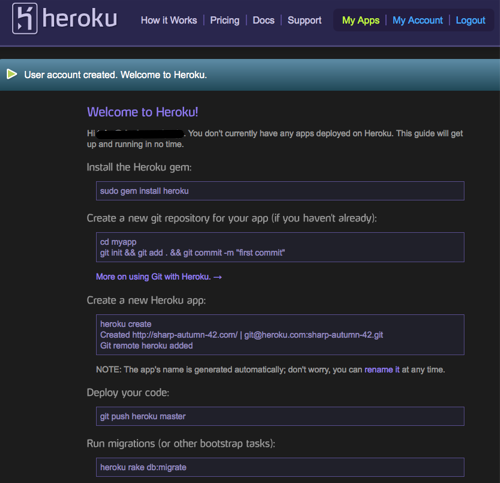

これで Heroku サービスの利用が可能となる。
ローカル(開発環境)側の環境準備
gem で heroku コマンドをインストールする。
$ sudo gem install heroku
Password:
Building native extensions.  This could take a while...
Successfully installed rest-client-1.0.3
Successfully installed configuration-0.0.5
Successfully installed launchy-0.3.3
Successfully installed json-1.1.7
Successfully installed heroku-1.0
5 gems installed
Installing ri documentation for rest-client-1.0.3...
Installing ri documentation for configuration-0.0.5...
Installing ri documentation for launchy-0.3.3...
Installing ri documentation for json-1.1.7...
Installing ri documentation for heroku-1.0...
Installing RDoc documentation for rest-client-1.0.3...
Installing RDoc documentation for configuration-0.0.5...
Installing RDoc documentation for launchy-0.3.3...
Installing RDoc documentation for json-1.1.7...
Installing RDoc documentation for heroku-1.0...
お試しなので、デプロイするアプリは何でもよいのだが、ここでは、GitHub にある Sinatra アプリの Heroku へのデプロイサンプルを使ってみる。
“Congradulations! You’re running a Sinatra application on Heroku!” とだけ表示する非常にシンプルなアプリケーションだ。。
$ cd ~/work/
$ git clone git://github.com/sinatra/heroku-sinatra-app dr-heroku-sinatra-test
Initialized empty Git repository in /Users/hoge/work/dr-heroku-sinatra-test/.git/
remote: Counting objects: 38, done.
remote: Compressing objects: 100% (32/32), done.
remote: Total 38 (delta 8), reused 0 (delta 0)
Receiving objects: 100% (38/38), 5.58 KiB, done.
Resolving deltas: 100% (8/8), done.
$ cd dr-heroku-sinatra-test/
アプリケーションを Heroku に配置する
heroku コマンドを使って、ローカルにあるアプリを Heroku にデプロイできる状態にする。
この作業を実施するにあたっては、
- アカウント作成時に登録を行ったメールアドレスとパスワードの準備
- SSH で使用する鍵
- Git の利用環境
上記 3 点が用意されている必要がある。
heroku create を利用する。引数には、任意のアプリケーション名称を与える。
$ heroku create dr-heroku-sinatra-test
Enter your Heroku credentials.
Email: hoge@designrecipe.jp
Password:
Uploading ssh public key /Users/hoge/.ssh/id_rsa.pub
Created http://dr-heroku-sinatra-test.heroku.com/ | git@heroku.com:dr-heroku-sinatra-test.git
Git remote heroku added
上記コマンドの中で、SSH で利用する公開鍵の登録も行っている。
また、git の設定情報が変更されている。
$ git config --list
user.name=Hoge Fuga
user.email=hoge@designrecipe.jp
color.ui=auto
core.repositoryformatversion=0
core.filemode=true
core.bare=false
core.logallrefupdates=true
core.ignorecase=true
remote.origin.url=git://github.com/sinatra/heroku-sinatra-app
remote.origin.fetch=+refs/heads/*:refs/remotes/origin/*
branch.master.remote=origin
branch.master.merge=refs/heads/master
remote.heroku.url=git@heroku.com:dr-heroku-sinatra-test.git
remote.heroku.fetch=+refs/heads/*:refs/remotes/heroku/*
remote の情報が追加されているようだ。
Heroku の環境に配置する。と言っても、通常の Git コマンドを利用して push しているだけだ。。
$ git push heroku master
The authenticity of host 'heroku.com (75.101.145.87)' can't be established.
RSA key fingerprint is 8b:48:5e:67:0e:c9:16:47:32:f2:87:0c:1f:c8:60:ad.
Are you sure you want to continue connecting (yes/no)? yes
Warning: Permanently added 'heroku.com,75.101.145.87' (RSA) to the list of known hosts.
Counting objects: 38, done.
Compressing objects: 100% (24/24), done.
Writing objects: 100% (38/38), 5.72 KiB, done.
Total 38 (delta 8), reused 38 (delta 8)

-----> Heroku receiving push
-----> Sinatra app detected
   Compiled slug size is 4K

-----> Launching...... done
   http://dr-heroku-sinatra-test.heroku.com deployed to Heroku

To git@heroku.com:dr-heroku-sinatra-test.git
 * [new branch]  master -> master
以上で完了となる。
デフォルトでは、heroku.com のサブドメインとして、**<app_name>.heroku.com**で公開される。
<app_name> は、heroku create を使用した際に命名したアプリケーション名になる。
上記手順の場合、http://dr-heroku-sinatra-test.heroku.com/ になる。
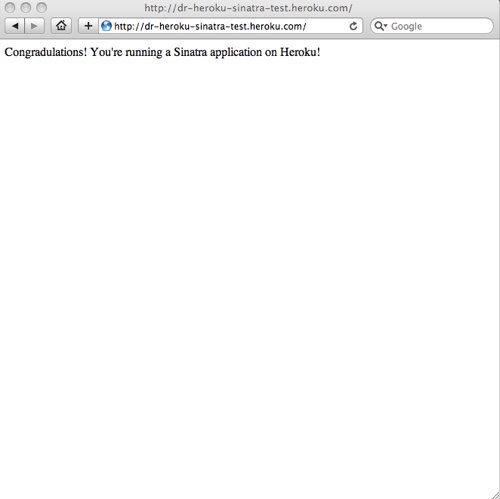
当然ながら、自ドメインも利用することは可能。
参考サイト
- Heroku Heroku Quickstart Guide
- Heroku Deploying Rack-based apps
Rack ベースのアプリ(Sinatra、Merb、Ramaze など)のデプロイ方法。 - InfoQ: Heroku の準備不要な Rails アプリケーションホスティングは革新的